01 / HUMANIZE
Let the prose breathe.
Eligible paragraphs are rewritten for a more natural flow. Your document provides the context, paragraph by paragraph.

A thoughtful second draft
Clearer, more natural prose. Back in your Word document,
with tracked changes and a careful check for meaning.
Free: 1,000 words a day, no sign-up
Files available for 24 h after completion
Sign in to use an existing balance, or return after the free allowance resets. Paid plans are coming soon.
Only eligible prose is rewritten. Review the changes before using your document.
Editing in progress
Your document is moving through four steps.
You can leave this page. Your job stays available for 24 hours after completion at this private link, on this device or in your signed-in account.
Ready for your review
Check the tracked changes and every flagged issue. You have the final say.
Let’s try again
We couldn't process this document. You were not charged.
Some paragraphs may be incomplete. Check omitted text against the original before accepting changes.
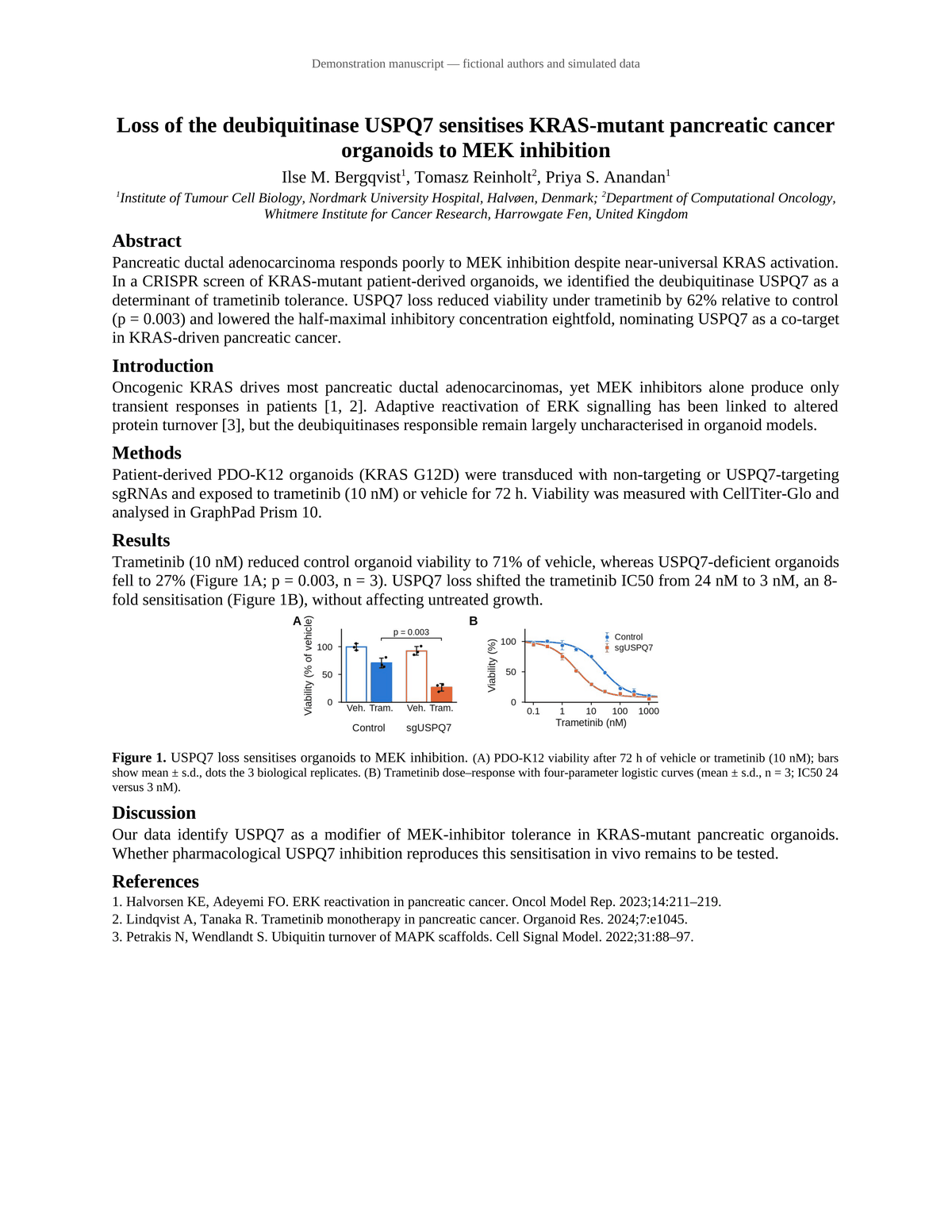
Example: a one-page manuscript before and after. Fictional demonstration; two sentence endings were manually closed. Review flags and omissions remain visible.
More than a rewrite
Writing is personal. The final decision
should always be yours.
01 / HUMANIZE
Eligible paragraphs are rewritten for a more natural flow. Your document provides the context, paragraph by paragraph.
02 / CHECK MEANING
A second review compares the rewrite with your source. Meaning shifts are highlighted; missing details go in the report.
03 / KEEP THE FORMAT
Get a clean copy and tracked changes in your original document structure. Read, accept, reject. It’s still your work.
Some things aren’t up for editing
Your technical terms and protected details shouldn’t become creative suggestions.
Paragraphs containing live citation fields, hyperlinks, comments, equations, drawings or content controls stay unchanged.
See the work, not just the result
Real renders of our fictional sample manuscript.
Move the slider to compare the same page.
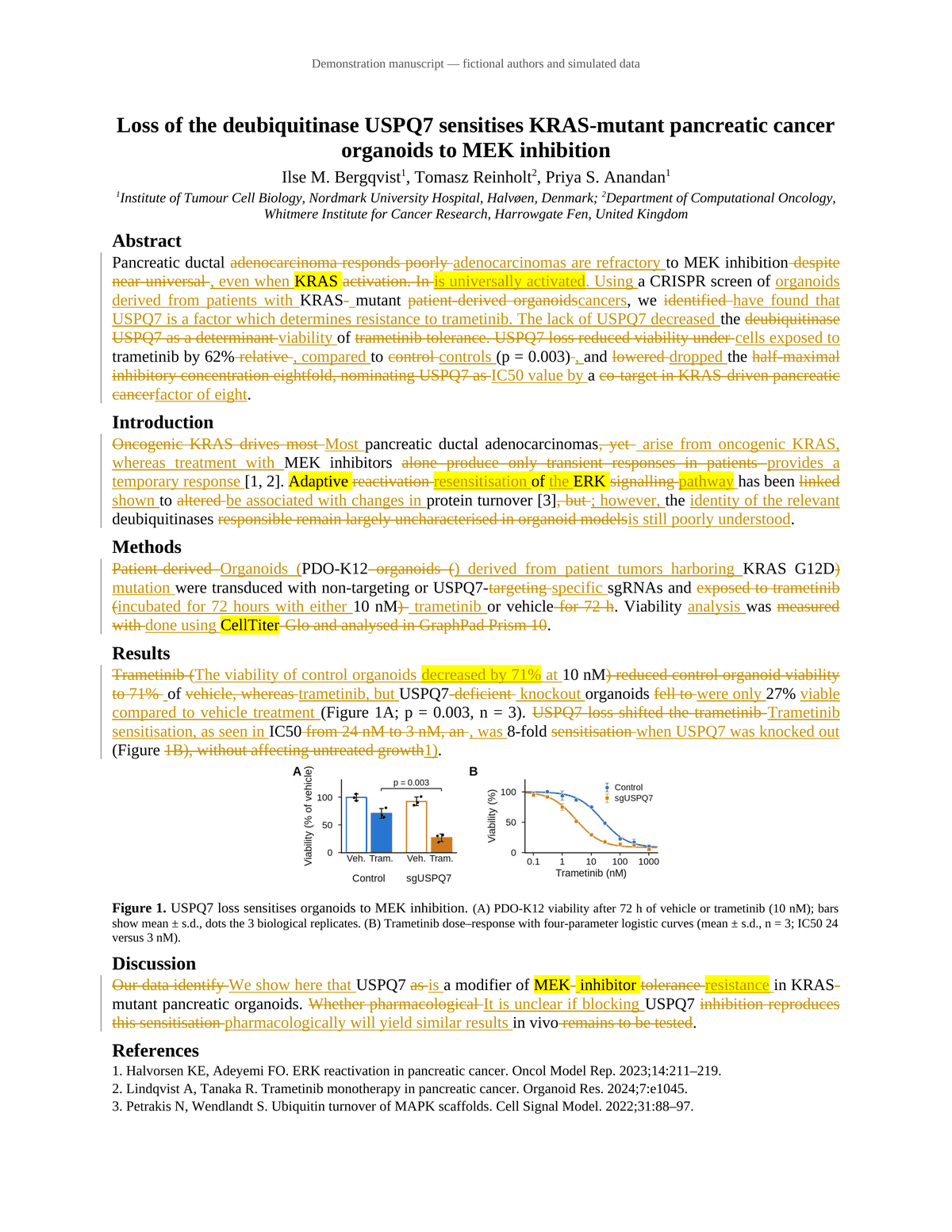
A highlight is an invitation to check
“near-universal KRAS activation”
REWRITE · FLAGGED FOR REVIEW“KRAS is universally activated”
The qualifier “near” was lost. That turns a qualified finding into an absolute statement. The yellow highlight brings the change back to your attention.
Highlights don’t catch everything. Omissions and paragraphs that may be incomplete appear in the Issues tab and report. Review these before accepting changes.
Demo disclosure: this is a fictional manuscript. Two sentence endings were manually closed; remaining omissions and review flags were retained.
Download the original sample .docxA little polish. A simple price.
Only the words we actually rewrite count.
Headings, references, tables and other preserved text don’t.
Free trial
$0 / day
For a first look or a short document.
Try your documentLite
$5 / once
For the next paper or proposal.
Standard
$12 / once
Room for a few careful drafts.
Pro
$30 / once
For longer projects and more pages.
Failed jobs aren’t charged. Individually incomplete paragraphs still count as processed words and are flagged for review. Paid checkout is not available yet. Refund policy ↗
One Word document (.docx) up to 25 MB. Research manuscripts, theses, essays, reports, proposals and book chapters are welcome. PDFs, older .doc files and macro-enabled documents aren’t supported.
We count source words in the prose we actually process. Preserved headings, references, captions, tables, front matter and other excluded paragraphs don’t count. Your quote shows the eligible words before you start; failed jobs aren’t charged.
A paragraph that is processed but may be incomplete is charged and flagged for your review. The daily free allowance resets at 00:00 UTC.
The rewrite is placed back into the original Word document, retaining its styles and structure. Technical terms, measurements, quotations and citation text are protected where identified.
Paragraphs containing live fields, including EndNote or Zotero citation fields, as well as hyperlinks, comments, equations, drawings or content controls stay unchanged. If you want those paragraphs rewritten, convert citation fields to plain text in a copy first.
Text length can change pagination. Check the final Word document before sharing it.
Yes. A separate review compares the rewrite with the source and flags significant meaning changes with yellow highlights. Omissions and paragraphs that may be incomplete are listed in the Issues tab and report.
The review cannot guarantee that it finds every problem. Tracked changes let you inspect, accept or reject edits in Word. You remain responsible for reviewing the result.
Uploaded documents and results are available for 24 hours after completion, or 24 hours after upload if you never start. They are then removed by a scheduled cleanup. Download your files while they’re available. Job counts, charges and timestamps are retained for 90 days for support and accounting.
Your document is processed on our servers and by contracted third-party AI processors to produce your result. Documents are not used for training. See our Privacy Policy for the details.
Allow minutes rather than seconds. Time depends on your document’s length, the review steps and the queue. Your job page shows its stage, elapsed time and queue position when available. You can return to that link on the same device, or while signed in to the same account.
Failed jobs release their reserved words. Unused purchased word balance is refundable on request within 14 days of purchase. Contact support@humandoc.app with your purchase details. Read our Refund Policy.